
Before I get into the nitty-gritty, I wanted to mention that im writing this series out of genuine interest and as a learning journey. If it helps you out or you find it usefull, you can always ping me on LinkedIn or the discussion board on Github for this project.
and you can also explore the code or try it for yourself, fork it or adjust it whichever way you like: Github
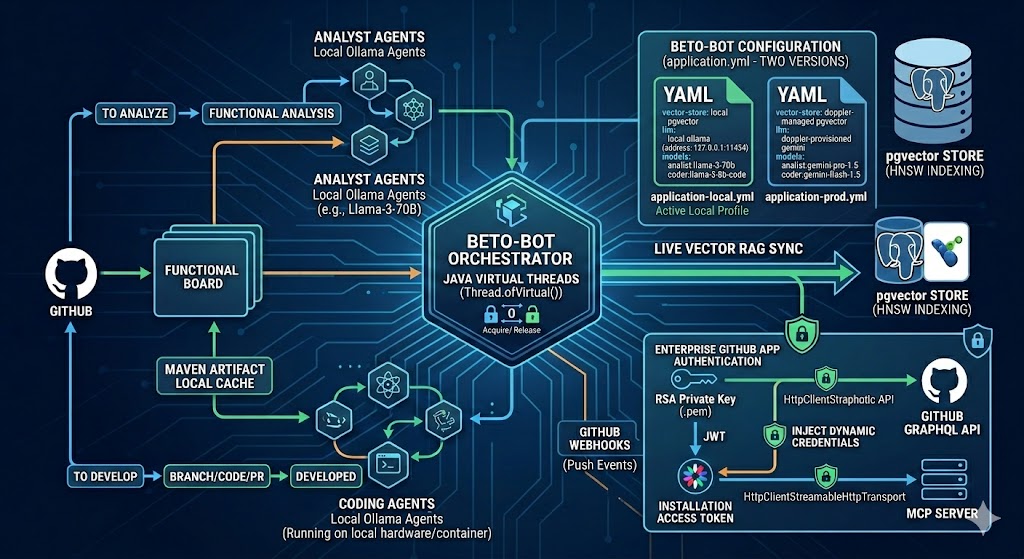 beto-bot1
The development of Beto-Bot—my multi-agent GitHub orchestration platform—continues to push ahead. While Java Virtual Threads have been baked into the platform's core from day one to handle non-blocking, concurrent agent execution, this latest iteration represents a massive leap forward in security, automation, and real-time data synchronization.
Another major change is going from remote LLM's to testing and using local LLM's levering Ollama.
Instead of poll-based snapshotting and static configurations, the platform now adapts dynamically to active repository adjustments using an event-driven RAG architecture and scoped GitHub App identity contexts.
Here is a deep dive into the major technical shifts over this past development cycle.
🏛️ Refined Platform Topology
Beto-Bot uses an orchestration workflow. Rather than blindly cramming an entire codebase into an LLM's context window, it targets specific keywords from the tasks of a project board, searches an internal vector store for relevant code context using similaritySearch, and schedules isolated agent runners concurrently.
A quick reminder:
The system's execution pipeline relies on four components:
- The Task Fetcher (
BetoBotTaskFetcher): A scheduled daemon that interrogates the GitHub Projects v2 GraphQL API, builds issue status matrices, and screens out tasks blocked by unclosed dependencies. - The Orchestrator (
BetoBotOrchestrator): An asynchronous workspace manager that consumes pending tasks and distributes them across non-blocking virtual threads, utilizing a concurrency semaphore to prevent overload during local LLM execution. - The Webhook RAG Sync Engine (
CodebaseSyncService): A continuous synchronization loop tied to a live GitHub Webhook endpoint that dynamically updates apgvectorstore during codebase updates and once when the application starts to have a clean workspace to start from. - The MCP Tooling Matrix (
Agent): An abstract supervisor that dynamically validates tool configurations and safely injects targeted owner/repository fields into downstream Model Context Protocol parameters. We've restricted the tools open to the specific agents and adjusted the context based on our RAG lookup.
🛠️ Major Engineering Shifts
1. Dynamic Vector RAG via Push Webhooks
Static documentation structures fall out of sync the moment a developer merges a change. To ensure that agents always reason over valid source files, Beto-Bot now incorporates a real-time repository synchronization layer powered by pgvector and an automated webhook controller.
When updates hit the master branch, GitHub dispatches a live payload into the system. The GithubWebhookController intercepts the event, validates signatures, parses the structural change list, and dispatches targeted update commands to our vector layers:
if ("refs/heads/master".equals(ref)) {
    logger.info("Push event received for master branch on {}. Triggering sync.", repoName);
    JsonNode commits = root.path("commits");
    commits.forEach(commit -> {
        commit.path("removed").forEach(file -> {
            String filePath = file.asText();
            codebaseSyncService.syncRepositoryRemoval(repoName, filePath);
            logger.info("File removed: {}", filePath);
        });
    });
    commits.path("modified").forEach(file -> {
        codebaseSyncService.syncRepository(repoName);
    });
}
we basically have a 'live' representation of our codebase in the vector DB, this mitigates the need to map and search the entire codebase using mcp tools when doing analysis.
Text snippets are dynamically structured, assigned deterministic IDs based on file paths, and indexed via an HNSW (Hierarchical Navigable Small World) cosine distance layout inside PostgreSQL. This ensures that when an agent claims a task, its context retrieval query receives matching, highly relevant system files.
2. Upgrading to Enterprise GitHub App Authentication
Relying on hardcoded Personal Access Tokens (PATs) poses a significant security liability and limits scalability when dealing with enterprise scopes. This iteration transitions completely to an automated GitHub App Authentication model.
Using Spring's Resource loader, the system securely streams an asymmetric RSA Private Key (.pem) from the host filesystem or classpath, signs a short-lived JSON Web Token (JWT) using RS256, and exchanges it with GitHub to claim scoped installation tokens on the fly. These temporary tokens are automatically attached to the authorization layers of our GraphQL query engine and the outbound HTTP-streamable MCP client connection channels.
@Bean
@Primary
public McpClientCustomizer<HttpClientStreamableHttpTransport.Builder> mcpClientCustomizer(GithubAppAuthService authService) {
    return (name, clientBuilder) -> {
        if (name.equals("github")) {
            clientBuilder.httpRequestCustomizer((builder, _, _, _, _) ->
                    builder.header("Authorization", "Bearer " + authService.getInstallationToken()));
        }
    };
}
🧑💻 Pipeline State Transitions
The multi-agent task lifecycle flows seamlessly across state tracking columns mapped on your organization project board:
- Analysis Phase: Tasks sitting in
To analyzetrigger an instance ofAnalystAgent. The agent fetches codebase snippets using semantic search, constructs a thorough functional layout directly within the issue comments, and moves the card toAnalyzed. - Human Validation Gate: A developer evaluates the analyst's layout. Once approved, dragging the ticket to
To developprimes the item for code modification. - Development Phase: The
CodingAgentclaims the approved task, checks out an isolated feature branch via MCP, updates the required lines, submits a new Pull Request, links the issue, and moves the tracking card toDeveloped.
Note: By using Github's
BlockingorBlocked Byrelationships in projects, you can create a fairly effective DAG (Directed Acyclic Graph), which is nothing more than a roadmap of how tasks should be handled. If issue #22 is blocked by issue #12, Beto-Bot will now pick up issue #12 first, and wont pickup #22 until #12 is fully merged and therefor completed.
🧠 Going Fully Local: Integrating Qwen 3 Coder with Ollama
Moving away from cloud-dependent APIs like Gemini doesn't just mean a drop in token costs—it gives you absolute privacy and control over your development pipeline. To make Beto-Bot completely self-hosted, I integrated a custom, fine-tuned Qwen 3 Coder (30B) model running directly on my local hardware station via Ollama.
By combining the raw power of a 30B parameter model with a highly structured Modelfile, Beto-Bot's CodingAgent transitions seamlessly from a remote cloud asset to an independent, heavy-duty local agent station.
The Blueprint: Crafting the Modelfile
To give the local model the exact behavioral boundaries, architectural bias, and technical focus required to execute automated tasks safely, I provisioned it with a custom Modelfile configuration:
FROM qwen3-coder:30b

# --- Runtime Engine Parameters ---
PARAMETER num_ctx 16384
PARAMETER temperature 0.1
PARAMETER repeat_penalty 1.05
PARAMETER top_k 20
PARAMETER top_p 0.9

# --- Core Behavioral Conditioning ---
SYSTEM """
You are 'Beto-Bot', a Senior Software Expert.
Your expertise is in Java, Spring Boot, Angular and Hexagonal Architecture.
Always prioritize clean code, SOLID principles, and decoupled business logic.
Technology stack: Java 24, Spring Boot, Maven, JUnit 5, Mockito, pgvector.
Never use placeholders. Always complete all steps of a task including moving it when done.
"""
Tuning for Agentic Precision
When running an agent locally, standard creative text-generation parameters will break the execution pipeline. The configuration keys above are explicitly balanced for raw logical consistency:
- Context Capacity (
num_ctx 16384): Crucial for code RAG patterns. A 16k context window gives the model ample room to consume the similarity search results pushed from ourpgvectorindex along with the incoming issue description without truncating critical file syntax. - Zeroed Temperature (
temperature 0.1): Drops creativity to near-zero. We don't want the model improvising new API design styles, we want hyper-deterministic, predictable code modifications that adhere to our existing database patterns.
Note: For models with reasoning, you can actually benefit from a higher temperature (1.1 - 1.4)
- Strict Penalty Constraints (
repeat_penalty 1.05): Prevents local code-generation models from falling into infinite loops or repeating identical blocks of code when generating large, complex class files.
Configuration Topology: Dual-Profile Spring Setup
To support this local layout smoothly beside the legacy cloud configurations, the codebase utilizes two separate application profile descriptors: application.yml (the base local profile targeting the internal Ollama instance) and application-google.yml (the cloud profile fallback).
When running locally, application.yml maps your active model environments and embedding models natively:
spring:
  ai:
    ollama:
      base-url: http://192.168.220.192:11434  # Dedicated local LLM station address
      chat:
        num-ctx: 16384
      embedding:
        options:
          model: embeddinggemma
By pairing this environment configuration with our orchestrator and a concurrency semaphore limit, the local hardware handles multiple heavy coding agent assignments sequentially without crashing or running out of memory. The agent acts with identical authority—reading files, processing RAG inputs, changing source lines via MCP, and opening pull requests completely on-premise.
🎯 What's next?
First thing to modify would be to make the task retrieval also reactive instead of polling. So implementing a webhook to send an event each time an issue enters a certain column.
With the foundational authentication and RAG synchronization architectures securely in place, the next phase of development will probably focus on implementing internal unit-test validation loops. We will be granting the CodingAgent the capability to run maven verification tasks locally within its tool cycle, allowing the agent to analyze error logs and refactor its code before opening a PR.